Last Updated: 18 October 2025

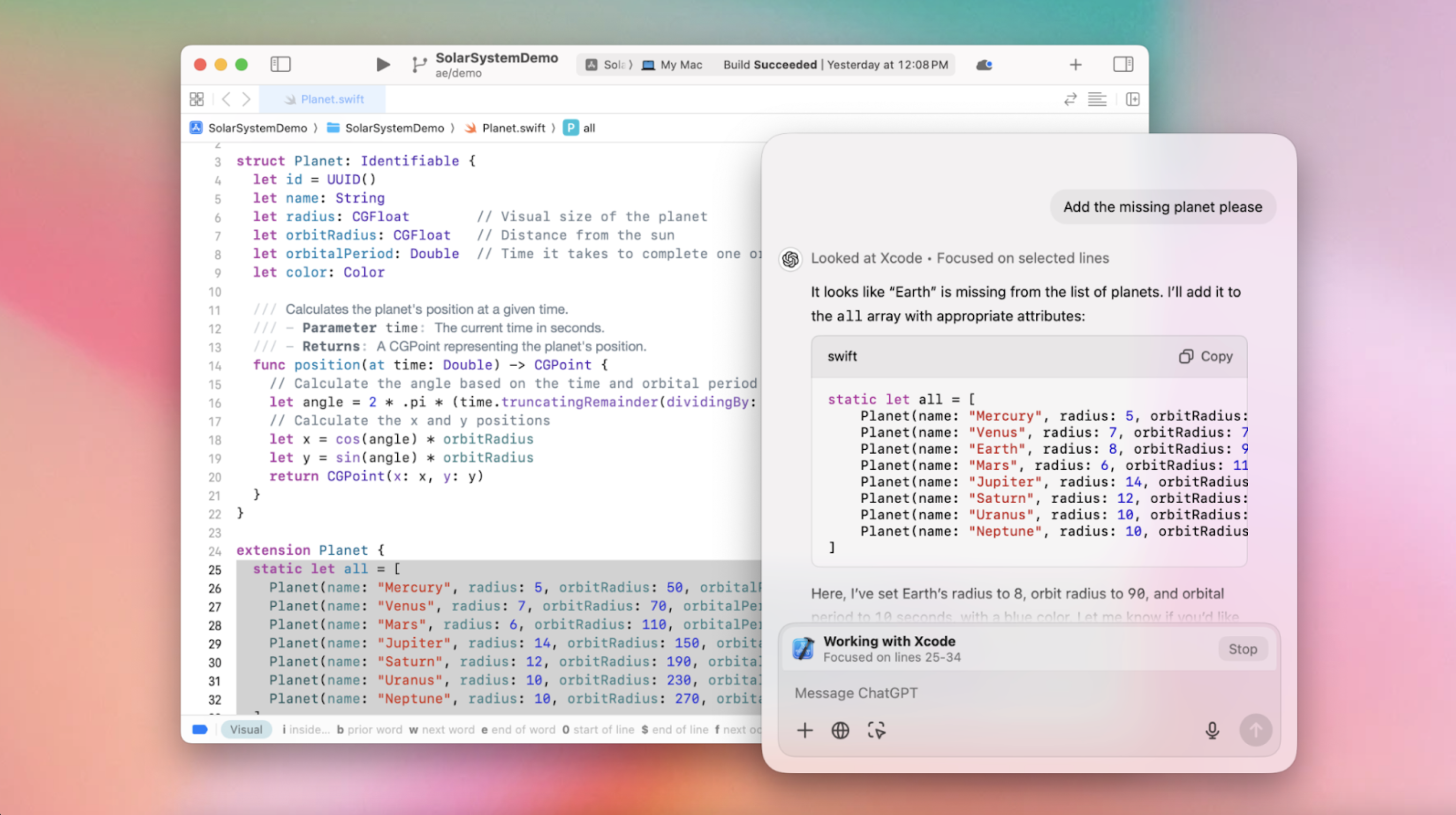
OpenAI has launched a transformative feature for macOS users: This is a before-and-after moment for developers—ChatGPT can now access and interact with your apps, making development tasks far more intuitive.
OpenAI clarified how data from the B feature is handled. Does ChatGPT store your data when using app integrations? Yes. Content shared during interactions is part of your chat history and may be used to enhance model performance, but you have full control over data storage and usage:
With ChatGPT integrated directly into these apps, developers no longer need to manually copy and paste code. Instead, ChatGPT can read and provide real-time assistance based on the content of your coding environment, making the whole process smoother and more efficient.
For developers, manually moving code snippets between applications can be a tedious, time-consuming task. ChatGPT’s new integration with macOS apps removes this barrier, allowing real-time interaction with your work.
Once activated, ChatGPT automatically reads your current code context, making it much easier to receive suggestions without needing to switch windows or handle cumbersome copy-pasting.
That said, there are still a few limitations. Unlike AI coding assistants like GitHub Copilot or Cursor, ChatGPT currently cannot directly edit code within these developer apps. Developers will need to paste ChatGPT’s suggestions back into their editor manually.
However, OpenAI has hinted that this is only the beginning, with plans for more seamless features in the future.
The Work with Apps feature is currently focused on developer tools, but OpenAI intends to expand to other applications, particularly text-based ones. The feature is available to Plus and Teams users today, with plans to extend to Enterprise and Education users in the coming weeks. Initially, it works with macOS apps by leveraging the accessibility API to read and interact with text—much like how Apple's VoiceOver feature functions.
This is not yet a full-fledged AI agent capable of interacting with all types of apps or visual elements like images or videos. For now, it works best with code and text, and it represents an important step toward a broader vision where AI can understand and operate across many of your computer's apps.
OpenAI clarified how data from the Work with Apps feature is handled. Content shared during interactions is part of your chat history and may be used to enhance model performance, but you have full control over data storage and usage:
For business users, OpenAI ensures that data sent through services like the API or ChatGPT Enterprise is not used to train models. See the Enterprise Privacy page for more details.
Looking forward, OpenAI has plans to expand these capabilities. While this feature is currently limited to coding tools and requires some user setup—such as installing special extensions for apps like VS Code—OpenAI envisions a future where ChatGPT could assist in real-time with other apps, like Microsoft Word, Zoom, or even games. In a recent demo, an OpenAI employee used ChatGPT to fill in missing details in a coding project in Xcode, offering a glimpse into how the feature might handle more complex tasks in the future.
This feature is still in beta, and OpenAI is actively collecting feedback to improve it further. OpenAI also aims to make sure that users always know what ChatGPT is “seeing” within the apps, emphasizing transparency and giving users full control over how the AI is used.
In addition to the macOS features, OpenAI has made ChatGPT's desktop app for Windows available for free, allowing all users—both paid and free—to enjoy its benefits. The Windows version brings similar capabilities, including advanced voice input, seamless app integration, and an Alt + Space shortcut for quick access. Previously, these features were restricted to premium users who paid at least $20 a month.
With the arrival of Work with Apps and further expansion into Windows, ChatGPT is taking significant strides toward a more integrated user experience. It’s not just a separate assistant anymore; it’s becoming a tool that fits seamlessly into your daily workflow, helping you get more done without the hassle of constantly switching between apps.